
Job Scheduling Software for Service Teams
See every job on a calendar, assign the right technician, and stop missing appointments — without juggling a whiteboard and a group chat.
No credit card required
Features
What job scheduling software for service teams actually does
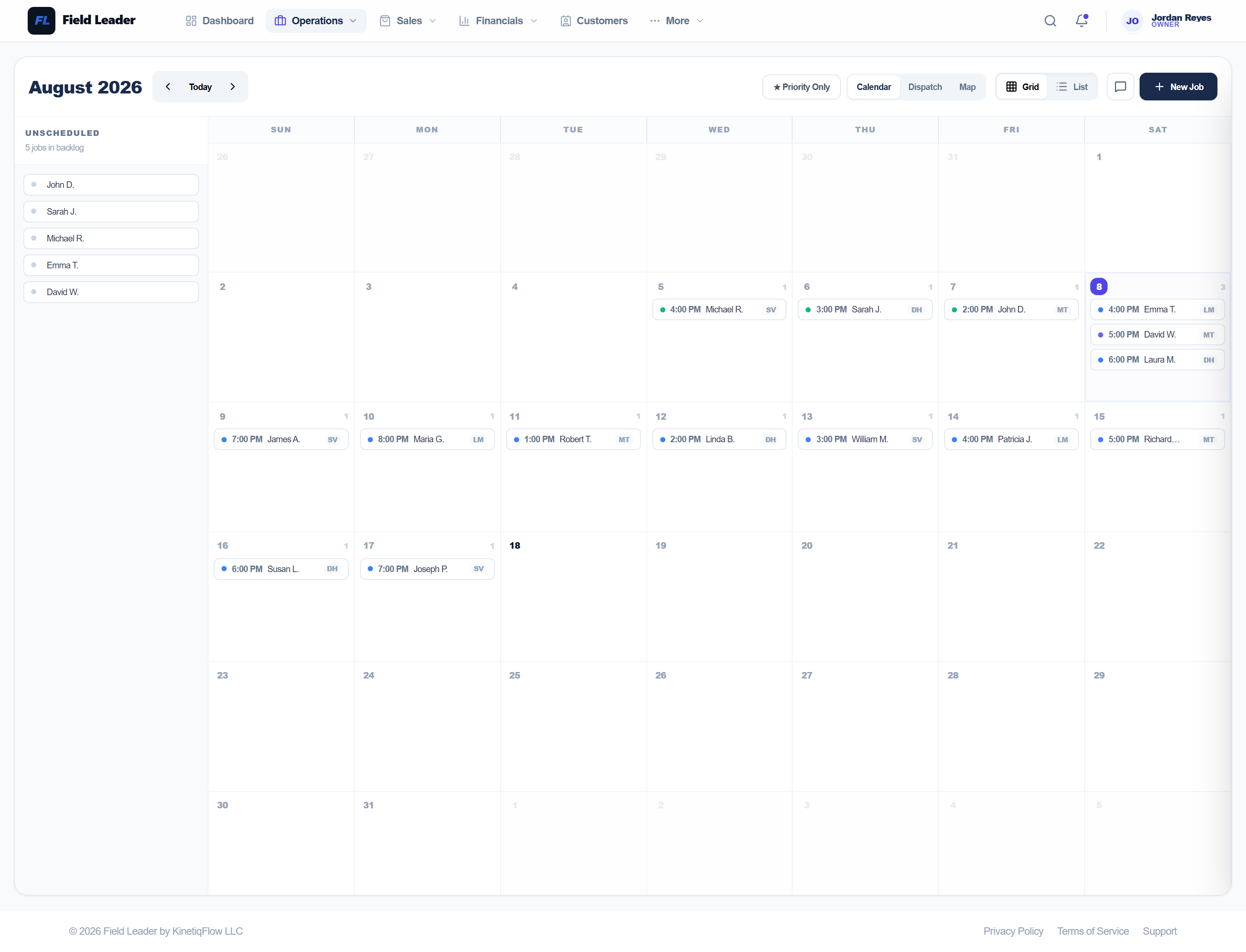
See Your Full Week at a Glance
Every scheduled job sits on a visual calendar. Spot open slots, catch conflicts, and reassign technicians without leaving the view.
Create a Job in Seconds
Log the job with customer, address, and scope. Set a scheduled date and it appears on the dispatch calendar immediately.
Put the Right Tech on Every Job
See who's available, who's already on a job, and how many jobs each technician has today — before you assign.
How It Works
From start to finish
Create Job
Log the job with customer name, address, and scope of work. Takes under a minute.
Schedule It
Pick a date and time. The job appears on the dispatch calendar immediately.
Assign a Tech
See who is available and assign directly from the job or calendar view.
Track to Completion
Job moves through Scheduled → En Route → On Site → Completed. No phone tag.
Related Features
Dispatch Software for Service Businesses
Schedule jobs, assign technicians, and track every visit from a single calendar — no group texts, no missed calls, no spreadsheets.
Work Order Software for Service Businesses
Log the job with customer, address, scope, and line items — then track it from Scheduled to Completed without losing a single detail.
Invoicing Software for Contractors
Create an invoice, send a payment link, and get paid — without chasing anyone down. Built for HVAC, plumbing, electrical, and landscaping teams.
Built For These Industries
HVAC Software for Heating & Cooling Companies
Schedule tune-ups, track maintenance contracts, and get paid for emergency calls the same day.
Plumbing Software for Service & Repair Companies
Dispatch fast on emergency calls and invoice on-site from your phone before you leave the job.
Electrical Contractor Software
Quote the job, get approval, do the work, collect payment — all in the same system.
Landscaping Software for Lawn Care Companies
Keep track of every property, automatically schedule recurring services, dispatch crews, send invoices, and get paid — without the paperwork.
FAQ
Common questions about job scheduling software for service teams
Ready to get started?
See every job on a calendar, assign the right technician, and stop missing appointments — without juggling a whiteboard and a group chat.
Start FreeNo credit card required